Patta Chitta Online TN: View, Download, FMB & Transfer Status
Patta Chitta is the Tamil Nadu Revenue Department’s record of who holds a piece of land. It lists the holder’s name, patta number, survey and sub-division numbers, extent, and whether the land is wet (nanjai) or dry (punjai). You can view and download it free on the government e-Services portal. Patta transfer applications go through the TamilNilam citizen portal, the TN e-Sevai portal or an e-Sevai centre.
This is an independent website, not affiliated with the Government of Tamil Nadu. We never ask for your Aadhaar number, OTP or any payment.
Which Tamil Nadu Portal Should You Use?
Tamil Nadu splits land services across three government websites. Most failed attempts start on the wrong one.
| What you want to do | Where to do it | Cost |
|---|---|---|
| View or download Patta Chitta, A-Register, FMB or TSLR | eservices.tn.gov.in | Free |
| Check whether a patta is genuine | eservices.tn.gov.in → Verify Patta / Chitta | Free |
| Check whether land belongs to the government (poramboke) | eservices.tn.gov.in → Verify Government / Private (Poramboke) Land | Free |
| Apply for patta transfer | tamilnilam.tn.gov.in/citizen, tnesevai.tn.gov.in or any e-Sevai centre | ₹60 at a centre |
| Track a transfer application | eservices.tn.gov.in → Know your Application status | Free |
| View an Encumbrance Certificate (EC) or guideline value | tnreginet.gov.in (Registration Department) | Free to view; certified EC is a paid application |
Approved transfers are updated in TamilNilam, the Revenue Department’s land records system, and then show on the e-Services portal.
What Is Patta Chitta?
A patta is the revenue record that names the person who holds a piece of land and pays its land tax. The chitta was a separate village record, kept by the Village Administrative Officer (VAO), showing the land’s area, holder and whether it was wet or dry. Since 2015, both have been issued together as one Patta Chitta extract. In Tamil, பட்டா (patta) is the holding record in the holder’s name, and சிட்டா (chitta) is the village account of each holding’s area and land type.
It is issued by the Revenue Department through the Tahsildar at your taluk office. Each extract lists the district, taluk and revenue village, patta number, holder’s name, survey and sub-division numbers, extent, land classification and assessment.
Banks and Sub-Registrar offices ask for it, but a patta is not a title deed. The Supreme Court has held that entries in revenue records do not by themselves confer ownership. Your registered sale deed and the chain of earlier deeds prove title. The patta shows that the government has recorded you as the holder.
Buying a flat? Patta is issued for land, not individual apartments. Flat owners hold an undivided share of the land, so check that the land’s patta is clear before you buy.
How to View and Download Patta Chitta Online
You don’t need an account or a fee. Keep your district, taluk and village names ready, along with the patta number or the survey and sub-division numbers from your sale deed.
Rural and Natham land
- Open eservices.tn.gov.in and choose Tamil or English.
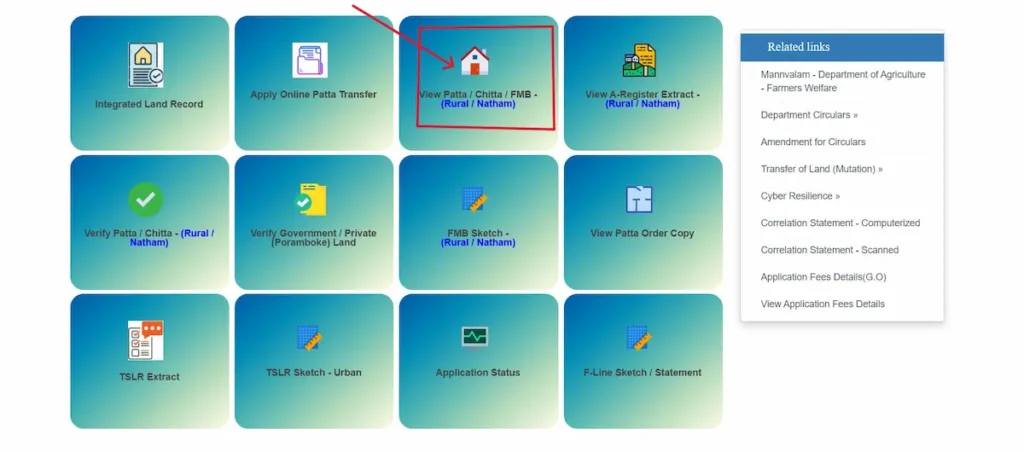
- Click View Patta / Chitta / FMB – (Rural / Natham).
- Select the district, taluk and revenue village.
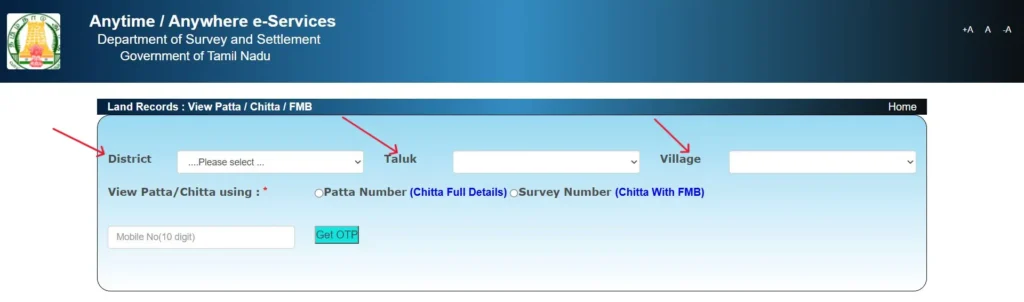
- Under View Patta/Chitta using, choose Patta Number (Chitta Full Details) or Survey Number (Chitta With FMB), then enter the number. If you have neither number, use our name search guide first.
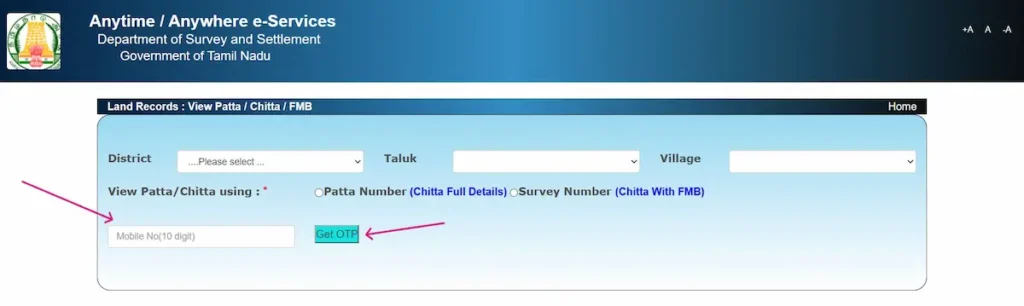
- Enter your 10-digit mobile number, click Get OTP, type the 6-digit OTP and click Confirm OTP.
- Click Submit. The extract opens; use the print option to print it or save it as a PDF.
Urban land (TSLR extract)
Inside town survey areas, including Chennai, land is recorded in the Town Survey Land Register (TSLR). Click TSLR Extract, select the district, taluk, town, ward and block, then pick the town survey and sub-division numbers. It also asks for a mobile number and OTP. For the plot sketch, use TSLR Sketch – Urban. Our guide to town survey records covers ward and block numbers and Chennai land.
If no record appears
- Check the revenue village. It can differ from your postal address or panchayat name. Your sale deed or previous patta shows the correct one.
- Match the sub-division exactly as written on your sale deed or previous patta.
- Recently sub-divided land may have new sub-division numbers. Search by patta number instead, or ask your VAO for the current numbers.
- If the page times out, reload it and request a new OTP.
- If the page times out or shows “Invalid input”, go back to the portal home page and start again. More no-record fixes cover OTP and error messages.
How to Read Your Patta Chitta in English
Patta Chitta extracts show owner names in Tamil. The e-Services portal asks users not to run the browser’s translate option on them, because it can render names wrongly. A name spelled one way on your patta and another on your sale deed or ID can hold up a bank loan or a registration. Keep the Tamil original, and if you need an English version, have a translator write the name exactly as it appears on your ID.
These are the terms you’ll see on Patta Chitta and related land records:
| Tamil term | English meaning | What to check |
|---|---|---|
| மாவட்டம் / வட்டம் / வருவாய் கிராமம் | District / Taluk / Revenue village | Same as your sale deed |
| பட்டா எண் | Patta number | Same as the seller’s documents |
| உரிமையாளர் பெயர் | Holder’s name | Spelling matches the seller’s ID |
| புல எண் / உட்பிரிவு எண் | Survey number / Sub-division number | Same as the deed schedule and FMB |
| நன்செய் / புன்செய் | Wet land / Dry land | Matches the deed’s land description |
| பரப்பு (ஹெக்டேர் – ஏர்) | Extent in hectares and ares | Convert using the table below |
| தீர்வை | Land assessment (land revenue) | For record only |
| அரசு / ரயத்துவாரி | Government / Ryotwari (private) land | Must be ryotwari for a private sale |
How to Check If a Patta Chitta Is Genuine
Extracts issued through the e-Services portal carry a reference number. To check a copy someone hands you:
- Open eservices.tn.gov.in and click Verify Patta / Chitta – (Rural / Natham).
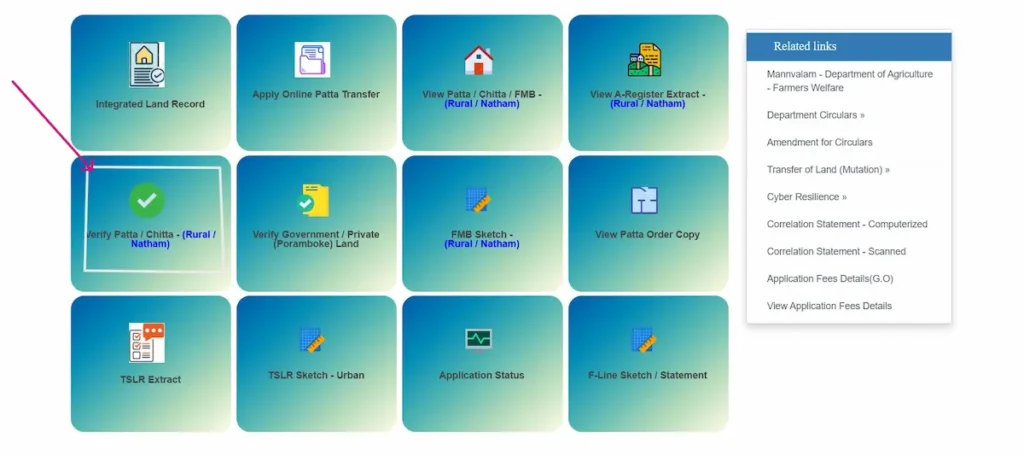
- In the “Reference Number to Verify Chitta Extract” box, enter the reference number printed on the extract.
- Enter your 10-digit mobile number, click Get OTP, and type the OTP you receive by SMS.
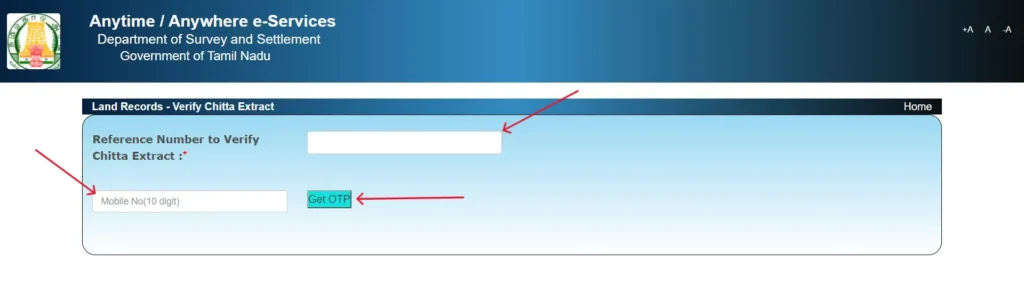
- Compare the record that appears with the paper copy, line by line.
Treat these as warning signs before paying any advance:
- The seller won’t let you download a fresh copy yourself.
- The holder’s name or extent differs from the sale deed.
- The survey or sub-division number doesn’t appear on the FMB sketch.
- Verify Government / Private (Poramboke) Land shows it as government land.
Download your own copy on the day you decide. Don’t rely on a printout from the seller or a broker.
Patta Chitta FMB Sketch: View and Use It
The FMB (Field Measurement Book) sketch is the Survey Department’s drawing of a survey field. It shows the field’s shape, the length of each boundary, its sub-divisions and the neighbouring survey numbers. You can view and download it free on the e-Services portal:
- Click FMB Sketch – (Rural / Natham).
- Select the district, taluk and village.
- Type the survey number, then pick the sub-division from the dropdown. For 24/2, type 24 and pick 2. If your survey number has no sub-division (just 24), pick “-“.
- Enter your 10-digit mobile number, click Get OTP, and type the OTP you receive by SMS.
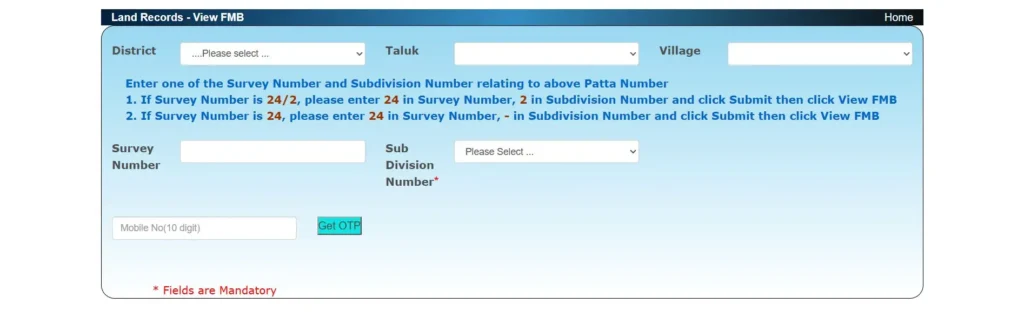
- Click Submit, then click View FMB to open the sketch and download it.
Take the sketch to the site. The shape and boundary lengths should match what’s on the ground and the boundary description in your sale deed. For urban plots, use the TSLR sketch instead. To see the field over satellite imagery, use the free TNGIS viewer explained in our satellite land map guide.
If the ground doesn’t match the sketch, apply through the taluk office or an e-Sevai centre for a government surveyor to measure and point out the boundaries. Do this before you pay for the land.
Patta Transfer: How to Apply and How TamilNilam Processes It
When you need a transfer
The patta must be changed to the new holder after a sale, gift, settlement, partition or inheritance. Your registered deed transfers ownership; the patta transfer updates the government’s record.
Automatic transfer after registration
Since 2021, registration data has flowed from the Sub-Registrar’s office into TamilNilam, the Revenue Department’s land records system. According to Tamil Nadu’s Director of Survey and Settlement, the patta transfers automatically only when the seller held an individual patta and the extent is unchanged, meaning no sub-division. Buyers get SMS alerts during registration and a confirmation once the transfer is done, and can then download the new patta from the e-Services portal. If your case involves sub-division, or the patta still shows the seller’s name, apply as below.
Documents to keep ready
- Registered sale, gift, settlement or partition deed
- Encumbrance Certificate
- Previous patta, if available
- ID proof
- For inheritance: the death certificate and legal heir certificate (the TamilNilam online form accepts only registered sale, settlement, partition and gift deeds)
How to apply online
You can apply online through the TamilNilam citizen portal (linked as “Apply Online Patta Transfer” on the e-Services portal), through the TN e-Sevai portal, or at any e-Sevai centre.
- Open the TamilNilam citizen portal, or sign in to the TN e-Sevai citizen portal (register as a new user if you don’t have an account).
- Choose the application type: Not Involving Sub Division (NISD) or Involving Sub Division (ISD) on TamilNilam, or the patta transfer service on e-Sevai.
- Enter the property details and upload your documents.
- Pay the fee shown and save your application number.
Applying at an e-Sevai centre
If you’d rather not apply yourself, any e-Sevai centre (Common Service Centre) will file the application for ₹60. Take all your documents with you.
How to Check Patta Chitta Transfer Status
- Open the e-Services portal home page and click Know your Application status.
- Enter your application number and submit.
This covers online patta transfer applications for both rural and urban land. Your application number is on the acknowledgement from TamilNilam, the e-Sevai portal or the e-Sevai centre.
Download the Patta Order Copy
Paragraph: Once the transfer is approved, download the order from the e-Services home page:
Numbered list:
- Click View Patta Order Copy.
- Enter the Application Id in the format 0000/0000/00/000000.
- Enter your 10-digit mobile number, click Get OTP and type the OTP.
- Submit to open the order copy.
What happens to your application
The VAO checks the land and the buyer, seller and survey details. The Tahsildar or Zonal Deputy Tahsildar then approves or rejects the transfer. Where sub-division is needed, officials have been instructed to complete the survey within 30 days.
If it’s rejected or stuck
- Rejected: the order should state reasons. In March 2026, the Madras High Court set aside a patta transfer rejection that gave no explanation and sent it back for fresh consideration.
- Appeal: against an order of the Tahsildar or Deputy Tahsildar, you can appeal to the Revenue Divisional Officer (Sub-Collector), with a further revision to the District Revenue Officer.
- Delayed: raise a grievance with the CM Helpline on 1100 or at cmhelpline.tnega.org, or file an RTI request with the taluk office to find out where the file is pending.
Patta Chitta Helpline Numbers
These are the official Tamil Nadu government contacts for land record help. This website cannot check or change any application.
- e-Sevai helpdesk: 1800 425 6000 (toll-free), tnesevaihelpdesk@tn.gov.in
- CM Helpline: 1100, or cmcell@tn.gov.in
- e-Services portal feedback: eservices@tn.nic.in
Patta, A-Register, Adangal and EC: What Each Document Shows
| Document | Kept by | What it shows | Where to get it |
|---|---|---|---|
| Patta Chitta | Revenue Department, through the Tahsildar | Holder, survey and sub-division numbers, extent, land type, assessment | e-Services portal, free |
| A-Register | Revenue Department | Village-level details for each survey number: patta number, area, tax, soil and land type, water source, holder | e-Services portal, free |
| Adangal | VAO | Season-wise cultivation and crop details for each survey number | CLIP e-Adangal, free (see our adangal guide); not on the e-Services portal |
| EC | Registration Department (Sub-Registrar) | Registered sales, mortgages and other deeds on the property for a chosen period | tnreginet.gov.in |
Each document fills a different gap. Patta shows whom the government records as holder, the EC shows registered deals and mortgages, and Adangal shows how the land is actually used. Before buying, make sure all of these agree with each other and with the FMB sketch. An EC lists only registered transactions, so an unregistered agreement won’t appear on it.
Land Types and Patta Types on Your Record
Land classes
- Nanjai (நன்செய்): irrigated wet land.
- Punjai (புன்செய்): dry agricultural land.
- Manavari (மானாவாரி): rain-fed land.
- Natham (நத்தம்): village residential land.
- Poramboke (புறம்போக்கு): government land reserved for public use, such as water bodies, roads and grazing land. Before buying any plot, run Verify Government / Private (Poramboke) Land on the e-Services portal.
Patta types
- Joint patta: one patta covering several holders, common with inherited land. A co-holder who wants a separate patta must first partition the land by a registered deed, then apply for a transfer with sub-division.
- UDR patta: issued under the Updating Registry scheme, which ran from 1979 to 1987 to bring land records in line with actual holders.
- Assignment patta: issued for government land assigned to a person, often with a clause barring sale for a fixed number of years. Read the conditions and the assignment date before buying.
Convert Patta Extent to Cents, Acres and Square Feet
Pattas record extent in hectares and ares, while buyers and brokers usually talk in acres, cents and grounds.
| Unit | Equals |
|---|---|
| 1 hectare | 100 ares = 2.471 acres ≈ 247.1 cents |
| 1 are | 100 sq m ≈ 1,076 sq ft ≈ 2.47 cents |
| 1 acre | 100 cents = 43,560 sq ft |
| 1 cent | 435.6 sq ft |
| 1 ground | 2,400 sq ft |
For example, 0.40 hectares is 40 ares, about 98.8 cents or 43,056 sq ft.
Common Patta Chitta Problems and How to Fix Them
Name spelled differently from your sale deed or ID
This usually comes from a clerical or transliteration error. Apply to the Tahsildar at your taluk office with the current extract, your registered deed and ID proof. The record changes only after the Tahsildar’s order.
Wrong extent or survey number
Often caused by an old sub-division or a survey error. Apply to the Tahsildar with the extract, registered deed and FMB sketch. Expect a field check by the VAO or surveyor first, so this can’t be completed fully online.
Patta still in the seller’s name after registration
Automatic transfer applies only when the seller held an individual patta and the extent is unchanged. Otherwise, apply for patta transfer through TamilNilam or e-Sevai with your registered deed and EC.
Joint patta, and one co-holder wants to sell
A co-holder can sell only their undivided share. The buyer can’t get a separate patta for a specific portion until the land is partitioned by registered deed and sub-divided.
Transfer after the holder’s death
Get a legal heir certificate (REV-114) through e-Sevai. The TamilNilam online form accepts a registered partition or settlement deed among the heirs; without one, ask the taluk office. See patta after death for both routes.
Patta and EC don’t match
Compare both with your registered deed to find which record is wrong. Patta errors go to the Tahsildar. EC errors go to the Sub-Registrar office where the deed was registered.
Checking Land Records Before You Buy
- Download a fresh Patta Chitta yourself on the e-Services portal.
- Match the holder’s name, survey number and extent with the sale deed.
- Check the FMB sketch against the boundaries on site.
- Run Verify Government / Private (Poramboke) Land for the survey number.
- Get an EC covering at least 30 years, the period lawyers commonly check.
- Check the guideline value for the property on TNREGINET.
- Have an advocate review the full chain of title deeds before you pay an advance.
பட்டா சிட்டா ஆன்லைனில் பார்ப்பது எப்படி? (சுருக்கமான வழிகாட்டி)
பட்டா சிட்டா, அ-பதிவேடு, புலப்படம் ஆகியவற்றை eservices.tn.gov.in இணையதளத்தில் கட்டணமின்றிப் பார்க்கலாம், பதிவிறக்கலாம்.
பார்க்கும் முறை
- eservices.tn.gov.in தளத்தைத் திறந்து தமிழ் மொழியைத் தேர்வு செய்யுங்கள்.
- “பட்டா / சிட்டா / புலப்பட விவரங்களை பார்வையிட – (ஊரகம் / நத்தம்)” என்பதைக் கிளிக் செய்யுங்கள்.
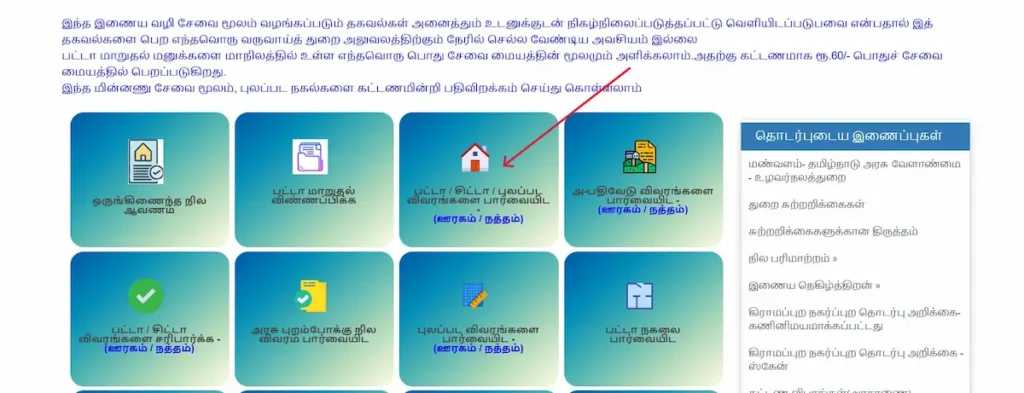
- மாவட்டம், வட்டம், வருவாய் கிராமம் ஆகியவற்றைத் தேர்வு செய்யுங்கள்.
- பட்டா எண் அல்லது புல எண், உட்பிரிவு எண்ணை உள்ளிட்டு, உங்கள் 10 இலக்க கைபேசி எண்ணை உள்ளிட்டு, வரும் OTP-ஐ உள்ளிட்டுச் சமர்ப்பியுங்கள்.
நகரப் பகுதி நிலங்களுக்கு “நகர நில அளவைப் பதிவேடு” பகுதியைப் பயன்படுத்துங்கள். ஒருவர் தரும் பட்டா உண்மையானதா என அறிய “பட்டா / சிட்டா விவரங்களை சரிபார்க்க” பகுதியில் குறிப்பு எண்ணை உள்ளிடுங்கள்.
பட்டா மாறுதல்: தமிழ்நிலம் குடிமக்கள் இணையதளம் (tamilnilam.tn.gov.in/citizen), இ-சேவை இணையதளம் (tnesevai.tn.gov.in) அல்லது இ-சேவை மையம் வழியாக விண்ணப்பிக்கலாம். மையத்தில் கட்டணம் ₹60.
புலப்படம் (FMB): eservices.tn.gov.in இல் FMB Sketch – (ஊரகம் / நத்தம்) பகுதியைத் திறந்து, மாவட்டம், வட்டம், கிராமம் ஆகியவற்றைத் தேர்வு செய்யுங்கள். புல எண்ணை உள்ளிட்டு உட்பிரிவைத் தேர்வு செய்யுங்கள் (24/2 எனில் 24, பிறகு 2; உட்பிரிவு இல்லையெனில் “-“). கைபேசி எண், OTP உள்ளிட்டு Submit, பிறகு View FMB கிளிக் செய்யுங்கள். புலப்படம் கட்டணமின்றிக் கிடைக்கும்.
விண்ணப்ப நிலை: eservices.tn.gov.in முகப்புப் பக்கத்தில் “Know your Application status” இணைப்பைக் கிளிக் செய்து விண்ணப்ப எண்ணை உள்ளிடுங்கள்.
கவனிக்க: பட்டாவில் பெயர்கள் தமிழ் யூனிகோட் எழுத்துருவில் இருக்கும். உலாவியின் மொழிபெயர்ப்பு (Translate) வசதியைப் பயன்படுத்த வேண்டாம்; பெயர்கள் தவறாக மாறக்கூடும்.
Patta Chitta FAQs
Is viewing Patta Chitta online free?
Yes. Viewing and downloading Patta Chitta, A-Register extracts and FMB sketches on the e-Services portal costs nothing. Fees apply only to applications such as patta transfer.
Is a downloaded Patta Chitta valid for banks and registration?
The portal’s records update directly from the Revenue Department. Anyone, including a bank or Sub-Registrar, can confirm a web-issued extract using its reference number.
Can I get Patta Chitta in English?
The portal works in English, but holder names stay in Tamil. Avoid browser translation; have a translator write the name exactly as on your ID.
How long does patta transfer take?
Without sub-division, it can happen automatically at registration. When sub-division is needed, officials have been instructed to finish the survey within 30 days; actual times vary.
Do I need a patta for a flat?
Patta is issued for land, not individual flats. Flat owners hold an undivided share of the land, so the land’s patta must be clear before you buy.
Can I sell land under a joint patta?
You can sell only your undivided share. To sell a specific portion with its own patta, partition and sub-divide the land first.
What if my patta isn’t updated after registration?
Automatic transfer needs an individual seller patta and an unchanged extent. If either is missing, apply through the TamilNilam citizen portal, the e-Sevai portal or an e-Sevai centre.
Is TamilNilam the same as the e-Services portal?
No. TamilNilam is the Revenue Department’s system that processes transfers. The e-Services portal is where you view, download and verify the updated records.
I lost my Patta Chitta copy. How do I get a duplicate?
You don’t need a duplicate. Download a fresh copy free on the e-Services portal at any time with the patta or survey number. Each copy carries a reference number that anyone can check under Verify Patta / Chitta.
Is there an official Patta Chitta app?
The TamilNilam app published by the National Informatics Centre (NIC) offers A-Register, Chitta PDF, transfer status, TSLR and FMB. Before installing any land records app, check that the developer is National Informatics Centre, and never pay an app to view Patta Chitta.
About This Guide and Our Sources
Every step, menu name and fee on this page comes from the Tamil Nadu government’s own portals and orders, and we test each step on the live portals ourselves. When a process changes, we update the page. You can confirm anything here at these official sources: